Direct Control
Interface Screenshot
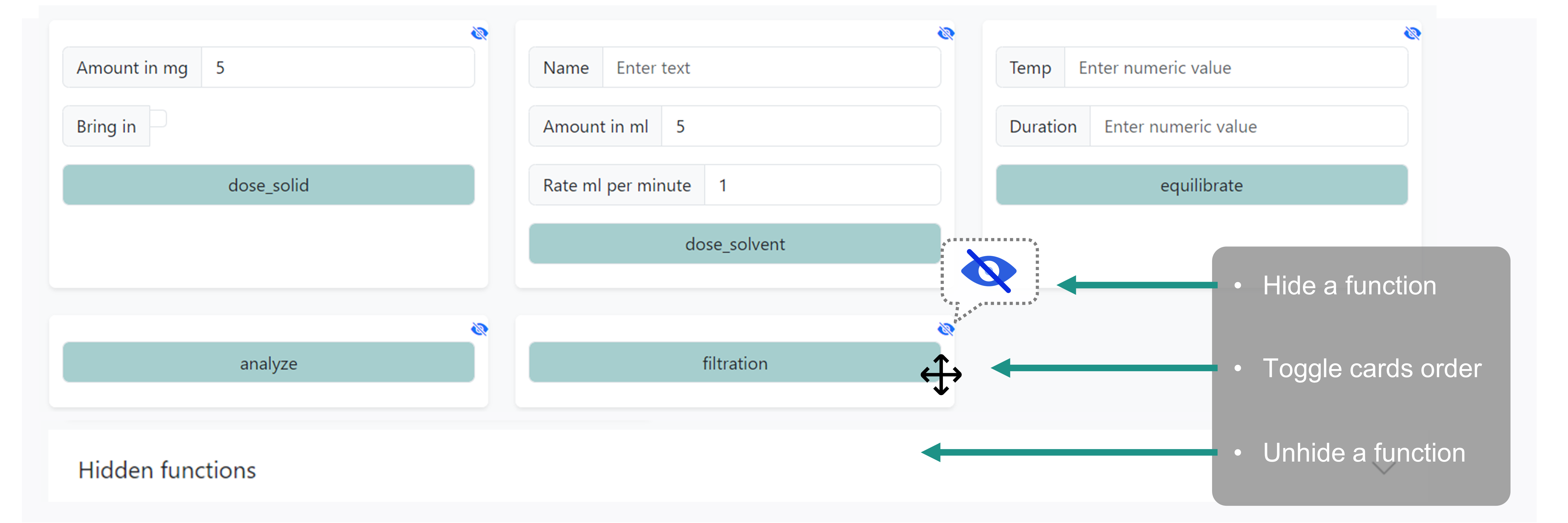
Control Routes
Resource |
Operation |
Description |
|---|---|---|
Control Customization |
Save method order |
|
PATCH /ivoryos/instruments/(string:instrument)/actions/(string:function) |
Toggle method visibility |
|
Direct Control |
device (instruments) and methods |
|
Get task by ID |
File Management Routes
Resource |
Operation |
Description |
|---|---|---|
Direct Control Files |
Download proxy Python interface |
Temp Devices Routes
Resource |
Operation |
Description |
|---|---|---|
Advanced Features |
Manually import API module(s) |
|
Manually import a deck |
||
connect to a new device |
||
Control Docs
- GET /ivoryos/instruments/(string: instrument)
- GET /ivoryos/instruments/
device home interface for listing all instruments and methods, selecting an instrument to run its methods
- GET /instruments
Get all available instruments for the control home page.
- GET /instruments/<string:instrument>
Get all methods and their interface schema for the specified <instrument>.
- POST /instruments/<string:instrument>
Execute a specific method on the specified <instrument>.
- Parameters:
instrument (str) – instrument name, if not provided, list all instruments
- Status Codes:
200 OK – render template with instruments and methods
- POST /ivoryos/instruments/(string: instrument)
- POST /ivoryos/instruments/
device home interface for listing all instruments and methods, selecting an instrument to run its methods
- GET /instruments
Get all available instruments for the control home page.
- GET /instruments/<string:instrument>
Get all methods and their interface schema for the specified <instrument>.
- POST /instruments/<string:instrument>
Execute a specific method on the specified <instrument>.
- Parameters:
instrument (str) – instrument name, if not provided, list all instruments
- Status Codes:
200 OK – render template with instruments and methods
- POST /ivoryos/instruments/(string: instrument)/actions/order
Save Order
- POST /instruments/<string:instrument>/actions/order
Save the custom drag-and-drop order for the methods of a specific instrument.
- Parameters:
instrument – The name of the instrument.
- Status Codes:
204 No Content – Order saved successfully.
- PATCH /ivoryos/instruments/(string: instrument)/actions/(string: function)
Hide Function
- PATCH /instruments/<string:instrument>/actions/<string:function>
Toggle the visibility of a specific method for an instrument in the control UI.
- Parameters:
instrument – The name of the instrument.
function – The name of the method to hide/show.
- JSON Parameters:
hidden (bool) – Whether the method should be hidden.
- Status Codes:
200 OK – Visibility updated successfully.
- GET /ivoryos/instruments/task/(int: task_id)
- GET /instruments/task/<int:task_id>
Retrieve a single task execution step by its ID from the database.
- Status Codes:
200 OK – Returns task details.
404 Not Found – Task not found.
- POST /ivoryos/instruments/console/execute
Execute raw python code quickly in the console using the global deck state.
File Management Docs
Temp Devices Docs
- POST /ivoryos/instruments/new/module
importing other Python modules
- POST /instruments/new/module
- Form Parameters:
filepath – API (Python class) module filepath
import the module and redirect to
GET /ivoryos/instruments/new/
- POST /ivoryos/instruments/new/deck-python
- POST /instruments/new/deck-python
- Form Parameters:
filepath – deck module filepath
import the module and redirect to the previous page
- GET /ivoryos/instruments/new/(string: instrument)
- GET /ivoryos/instruments/new/
interface for connecting a new <instrument>
- GET /instruments/new/
- GET /instruments/new/<string:instrument>
- Parameters:
instrument (str) – instrument name
- POST /instruments/new/<string:instrument>
- Form Parameters:
device_name – module instance name (e.g. my_instance = MyClass())
kwargs – dynamic module initialization kwargs fields
- POST /ivoryos/instruments/new/(string: instrument)
interface for connecting a new <instrument>
- GET /instruments/new/
- GET /instruments/new/<string:instrument>
- Parameters:
instrument (str) – instrument name
- POST /instruments/new/<string:instrument>
- Form Parameters:
device_name – module instance name (e.g. my_instance = MyClass())
kwargs – dynamic module initialization kwargs fields