Workflow Design
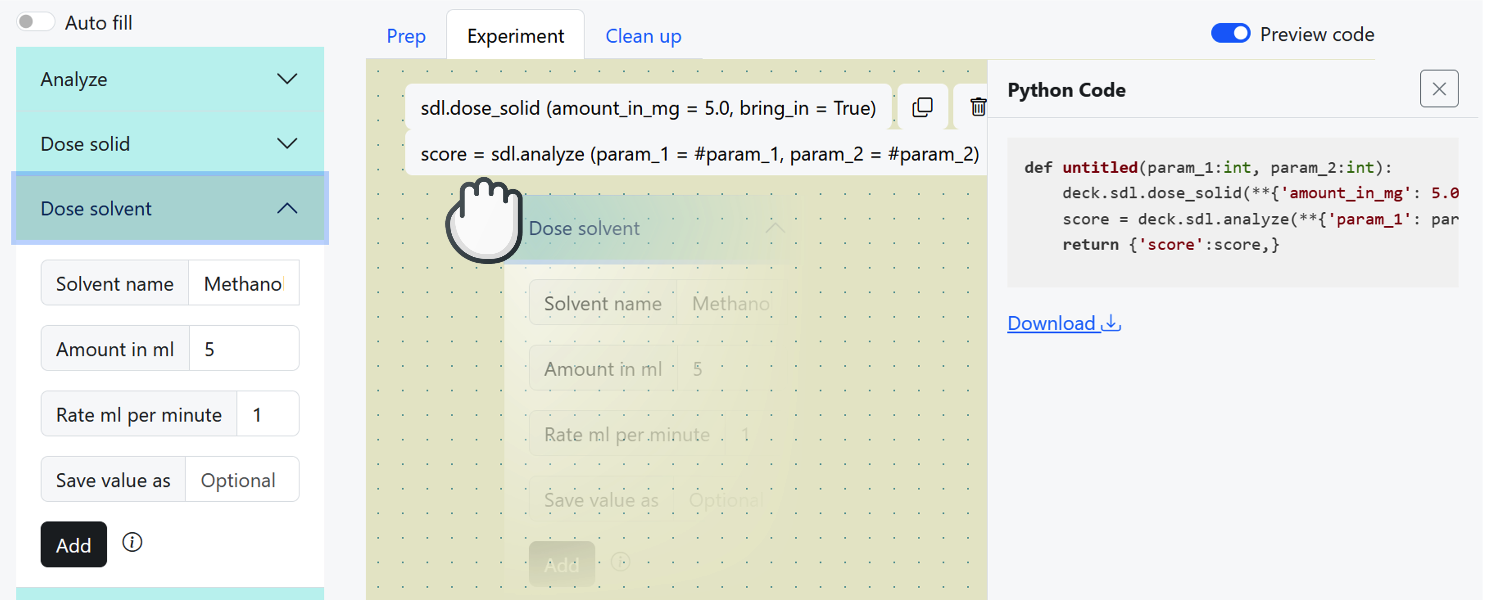
Interface Screenshot
Design Routes
Resource |
Operation |
Description |
|---|---|---|
Workflow Design |
Experiment builder interface |
|
Preview generated code |
||
Update script metadata |
||
Update design UI state |
||
clear the design canvas. |
||
convert Python to workflow script |
||
handle methods of a specific instrument |
||
Import Python script |
||
Confirm Python import |
||
Get available workflow variables |
Design Steps Routes
Resource |
Operation |
Description |
|---|---|---|
Workflow Design |
Get step editing form |
|
Save step changes |
||
Delete a design step |
||
Duplicate a design step |
||
Workflow Design Steps |
update the order of steps in the design canvas when reordering steps. |
Design File Management Routes
Resource |
Operation |
Description |
|---|---|---|
Workflow Design |
Import workflow from JSON |
|
Export workflow to Python |
||
Export workflow to JSON |
Design Agent Routes
Resource |
Operation |
Description |
|---|---|---|
Workflow Design |
process natural language input to automatically generate actions. |
Design Docs
- GET /ivoryos/draft
Experiment Builder
- GET /draft
Load the main experiment builder interface where users can design their workflow by adding actions, instruments, and logic.
- Status Codes:
200 OK – Experiment builder loaded successfully.
- GET /ivoryos/draft/code_preview
Compile Preview
- GET /draft/code_preview
Get a preview of the generated Python code for the current workflow.
- Query Parameters:
mode – The compilation mode (‘single’ or ‘batch’).
batch – The batch processing mode (‘sample’ or others).
- Status Codes:
200 OK – Returns the generated code as JSON.
- PATCH /ivoryos/draft/meta
Update Meta
- PATCH /draft/meta
Update the script metadata, such as the script name and status. If the script name is provided, it saves the script with that name. If the status is “finalized”, it finalizes and publishes the script.
- Form Parameters:
name – The name to save the script as.
status – The status of the script (e.g., “finalized”).
- Status Codes:
200 OK – Successfully updated the script metadata.
- PATCH /ivoryos/draft/ui-state
Update UI State
- PATCH /draft/ui-state
Update UI settings for the design canvas, such as showing code overlays, setting the editing mode, handling deck selection, or toggling autofill.
- Form Parameters:
show_code – Whether to show the code overlay (bool).
editing_type – The type of editing to set (prep, script, cleanup).
autofill – Whether to enable autofill (bool).
deck_name – The name of the pseudo-deck to select.
- Status Codes:
200 OK – Updates the UI state successfully.
- POST /ivoryos/draft/submit_python
- POST /draft/submit_python
Convert a Python script to a workflow script and save it in the database.
- Form Parameters:
workflow_name – workflow name
script – main script
prep – prep script
cleanup – post script
- Status Codes:
200 OK – clear canvas
- POST /ivoryos/draft/instruments/(string: instrument)
- POST /draft/instruments/<string:instrument>
Add methods for a specific instrument in the workflow design.
- Parameters:
instrument (str) – The name of the instrument to handle methods for.
- Status Codes:
200 OK – Render the methods for the specified instrument.
- GET /ivoryos/draft/instruments/(string: instrument)
- GET /ivoryos/draft/instruments
- GET /draft/instruments
Get all available instruments, variables, building blocks, and workflow controls for the design sidebar.
- GET /draft/instruments/<string:instrument>
Get the action forms for a specific instrument or workflow source.
- Parameters:
instrument (str) – Optional instrument or workflow source name.
- Status Codes:
200 OK – Render the methods for the specified instrument.
- POST /ivoryos/draft/import_python_file
Import Python File
- POST /draft/import_python_file
Upload a Python script file and extract workflow functions to be converted into visual cards.
- Form Parameters:
file – The Python (.py) file to import.
- Status Codes:
200 OK – Returns extracted workflows and identifies duplicate script names.
- POST /ivoryos/draft/confirm_import_python
Confirm Import
- POST /draft/confirm_import_python
Finalize the import of extracted workflows, optionally overwriting existing scripts in the database.
- JSON Parameters:
workflows – A dictionary of extracted workflows to save.
overwrite – A list of script names that should be overwritten.
- Status Codes:
200 OK – Returns success after saving the scripts.
- GET /ivoryos/draft/variables
- GET /draft/variables
Return variables available for autocomplete in the current script state.
- Query Parameters:
before_id – Optional step UUID. When provided, only variables available before that step are returned.
- Status Codes:
200 OK – Returns a JSON object with available variable names.
Design Steps Docs
- GET /ivoryos/draft/steps/(int: uuid)
Get Step
- GET /draft/steps/<int:uuid>
Retrieve the HTML editing form for a specific action step in the design canvas.
- Parameters:
uuid – The unique ID of the action step.
- Status Codes:
200 OK – Returns the step editing form (HTML).
404 Not Found – Step not found.
- POST /ivoryos/draft/steps/(int: uuid)
Save Step
- POST /draft/steps/<int:uuid>
Save the changes made to an action step, including updated arguments and return variables.
- Parameters:
uuid (int) – The step number id
- Status Codes:
200 OK – render template with action step form
- DELETE /ivoryos/draft/steps/(int: uuid)
Delete Step
- DELETE /draft/steps/<int:uuid>
Remove a specific action step from the current workflow design.
- param uuid:
The step number id
- type uuid:
int
- Status Codes:
200 OK – render template with action step form
Design File Management Docs
- POST /ivoryos/files/script-json
Load JSON
- POST /files/script-json
- Form Parameters:
file – workflow design JSON file
- Status Codes:
302 Found – load script json and then redirects to
GET /ivoryos/draft
- GET /ivoryos/files/script-python
Download Python
- GET /files/script-python
Export the current workflow design as an executable Python script.
- Status Codes:
302 Found – redirects to
GET /ivoryos/draft
- GET /ivoryos/files/script-json
Download JSON
- GET /files/script-json
Export the current workflow design as a JSON file for later use or sharing.
- Status Codes:
302 Found – redirects to
GET /ivoryos/draft
Design Agent Docs
- POST /ivoryos/agent/process_request
- POST /agent/process_request
A user prompt is processed, with the most likely actions are appended at the end of the workflow design. The arguments and their parameter are automatically extracted from the user request. If the variables are unknown the default value is taken or a dynamic variable is generated.
- Form Parameters:
prompt – User request to the design agent.
- Status Codes:
200 OK – Successfully generated new actions or successfully catched exception.